
Guide
How to Run a Sprint Retrospective in Trello
What to discuss, how to structure the meeting, and how to actually follow through on what comes out of it.
The sprint is done. Now what?
Most teams treat the retrospective as an afterthought - a box to check before starting the next sprint. They rush through it in 20 minutes, everyone says "communication could be better," and nothing changes.
Done well, the retro is the one ceremony that actually improves how the team works over time. It's the feedback loop that makes each sprint slightly better than the last.
What a sprint retrospective actually is
A retrospective is a team meeting at the end of each sprint to reflect on how things went - not what was built (that's the sprint review), but how the team worked together. What went well, what caused friction, and what to try differently.
Typical retros run 45-90 minutes for a two-week sprint. The whole team attends, plus the Scrum Master if you have one. Management usually doesn't - you want people to be honest about what isn't working.
Setting up a retro board in Trello
Trello is a natural fit for running retrospectives. The simplest setup is a dedicated board with three lists:
- Went Well - things the team wants to keep doing
- To Improve - things that caused friction, confusion, or wasted time
- Action Items - concrete things someone will actually do differently next sprint
Create one board for retros and reuse it sprint after sprint. You'll be able to scroll back and see how the team has evolved - and whether those action items from three sprints ago ever got resolved.
Some teams add a "Kudos" list to recognize specific teammates. Not mandatory, but a nice touch if your team is distributed and appreciation tends to get lost.
Running the meeting
Start with silent writing (5-10 min)
Everyone adds cards to Went Well and To Improve at the same time, independently. No discussion yet. This prevents the loudest person in the room from setting the agenda, and surfaces problems people might not raise if they had to say them out loud first.
Group similar cards (5 min)
Someone - usually whoever is facilitating - drags duplicate or related cards together. If four people wrote something about unclear requirements, that's one item, not four.
Vote on what to discuss (3-5 min)
If there are more items than you can cover, give everyone 3-5 votes. Move the highest-voted To Improve items into the discussion. You don't need to talk through everything - focus on what the team cares about most.
Discuss and create action items (20-30 min)
For each top item, the goal isn't to vent - it's to agree on something specific that will change. "Improve communication" is not an action item. "Alex will send a brief daily Slack update on blockers by noon" is.
Every action item needs an owner and a deadline. Cards without an owner don't get done. Assign them in Trello so responsibility is clear.
Close with the positives (5 min)
Don't end on the problems. Quickly walk through the Went Well list so the team leaves on a good note.
Using sprint data in the retrospective
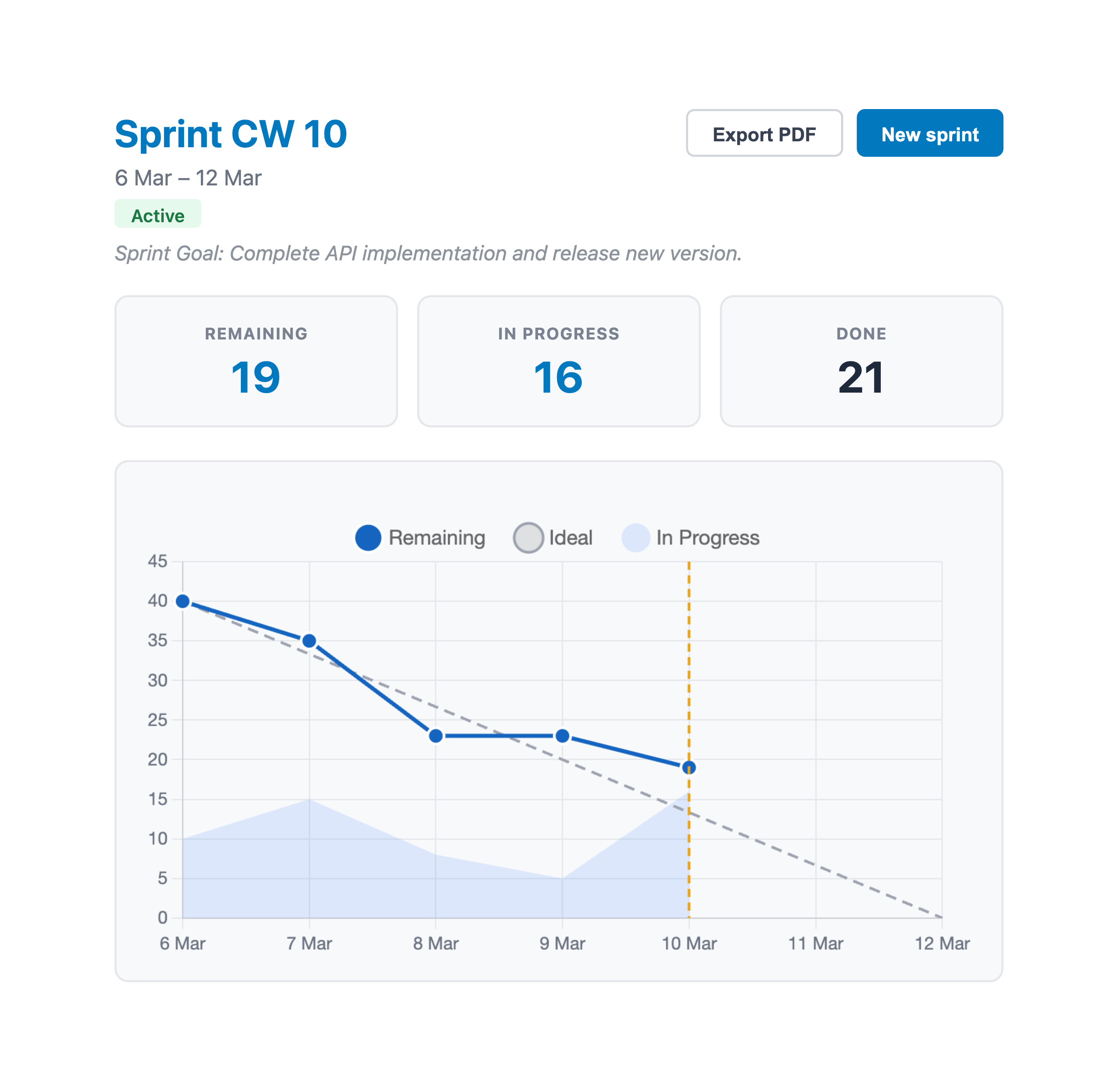
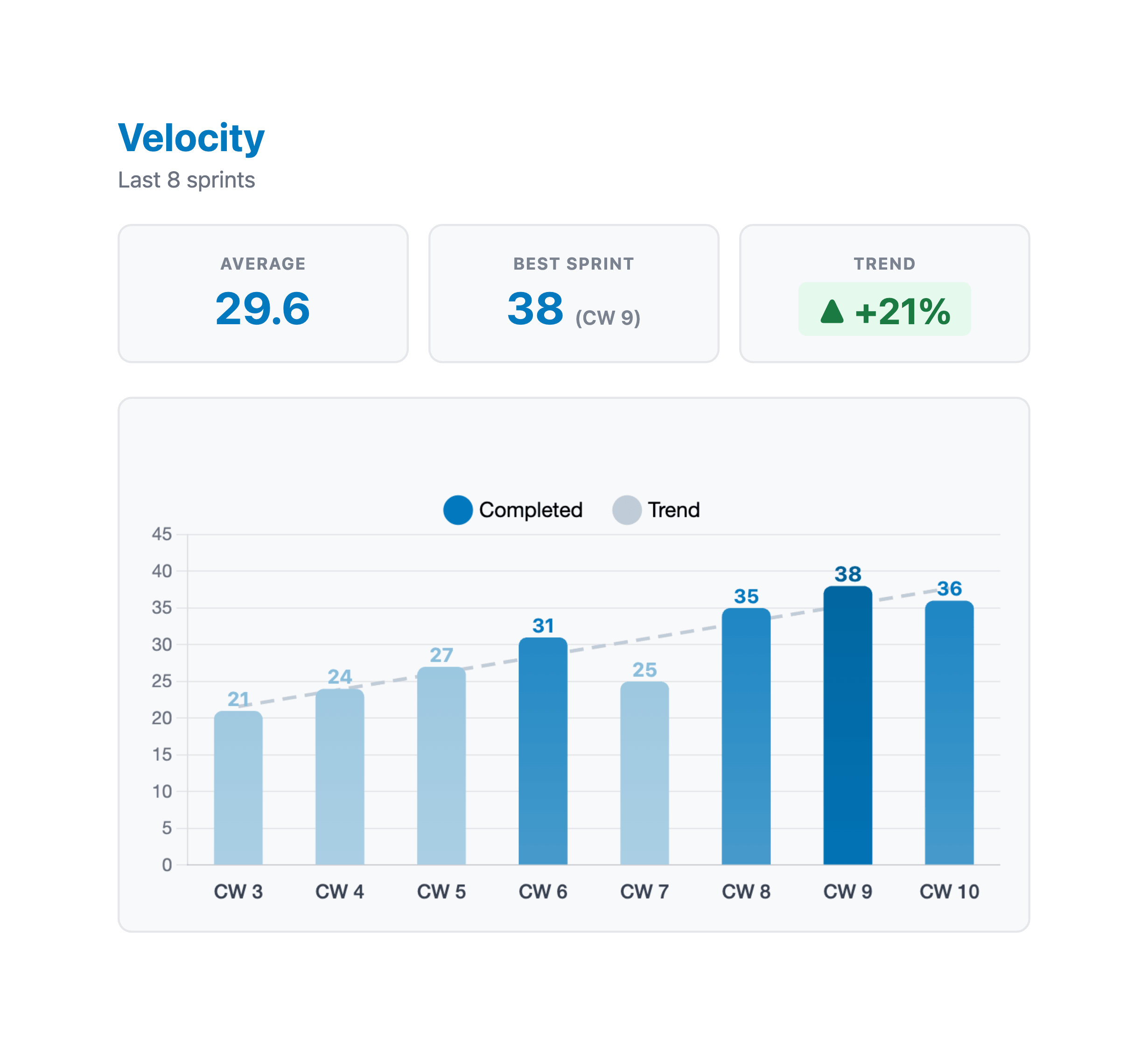
The best retros are grounded in data, not just feelings. Before the meeting, pull up the burndown chart and velocity for the sprint that just ended.
A burndown chart tells you whether the sprint actually went how everyone thought it went. If the team felt productive but the burndown shows most work landing in the last two days, that's worth discussing. A flat line for three days mid-sprint usually means something blocked the team - what was it?
Velocity trends over time are even more revealing. If velocity has been declining for three sprints in a row, that's not just a bad sprint - something structural has changed. Is the remaining backlog harder than usual? Is technical debt slowing things down? Did someone leave?
These aren't gotcha questions. The data just helps the team have a more honest conversation than "I think it went okay."
The real problem: follow-through
Most retros don't fail during the meeting. They fail between meetings.
Teams write action items, assign them, and then spend the next two weeks not doing them. The following retro starts and someone quietly moves the same cards from last sprint's action items into this sprint's To Improve list, slightly reworded.
A few things that help:
- Review action items at the start of the next retro. Before writing anything new, check what was committed to last sprint. Closed cards are done. Open cards need a reason.
- Keep action items visible. Pin the board or link it somewhere the team actually looks - not buried in a board nobody opens until the next retro.
- Limit how many you create. Two or three real changes are better than eight theoretical ones. Pick the things that will actually happen.
Retro anti-patterns
The blame game. Someone raises an issue and it turns into pointing at one person. Retros should be blameless - focus on process and systems. "The handoff between design and dev was unclear" is better than "Alex didn't communicate with the design team."
The same problems every sprint. If the same item keeps appearing in To Improve, either the action items aren't working, or the team doesn't have the authority to fix the underlying issue. Escalate it rather than write it down again.
Skipping it when things went fine. Retros aren't only for bad sprints. A great sprint still has something worth learning from - what specifically went well, and can you repeat it intentionally?
Skipping it when time is tight. The sprint review runs long, everyone's tired, let's just start planning. This is backwards - the retro is what prevents the same problems from repeating next sprint.
Where sprint data comes from
To make your retros data-driven, you need the data. Trello doesn't track burndown or velocity out of the box.
With EstiMate, both charts are built into your Trello board. Burndown charts track progress day by day throughout the sprint, and velocity is recorded automatically when you close a sprint and start a new one. By the time your retro starts, the data is already there - no spreadsheets, no manual tracking. Just open the sprint page and share with the team.
Keep reading
- Trello Sprint Planning Guide - the ceremony that kicks off each sprint
- Burndown Charts for Trello - track day-by-day sprint progress to bring into your retro
- How to Track Team Velocity in Trello - spot trends across sprints over time
- How to Set Up Trello for Scrum - board structure, ceremonies, and common pitfalls
- Planning Poker in Trello - get better estimates with team voting sessions
- Capacity Planning for Trello Teams - plan realistic sprint commitments based on availability
- How to Estimate Story Points in Trello - the foundation for velocity and burndown tracking
- Scrum vs Kanban in Trello - which workflow fits your team
- What 1,000 Trello Teams Taught Me About Estimation - patterns I keep noticing across teams
Bring data into your retrospectives
EstiMate adds burndown charts and velocity tracking to your Trello board - so your retros start with numbers, not just gut feelings. Free to get started.
Add EstiMate to Trello