Free Scrum Power-Up for Trello
Agile Planning, Re-EstiMated.
Assign story points per member, run planning poker sessions, visualize team workload, forecast when the work will be done, and track sprints with burndown charts and velocity. The agile estimation and project management Power-Up built for any team that estimates — right inside Trello.
Free to install · No sign-up required
Agile Estimation Features — Always Free
Everything you need for story point estimation, workload visibility, and capacity planning — at no cost.
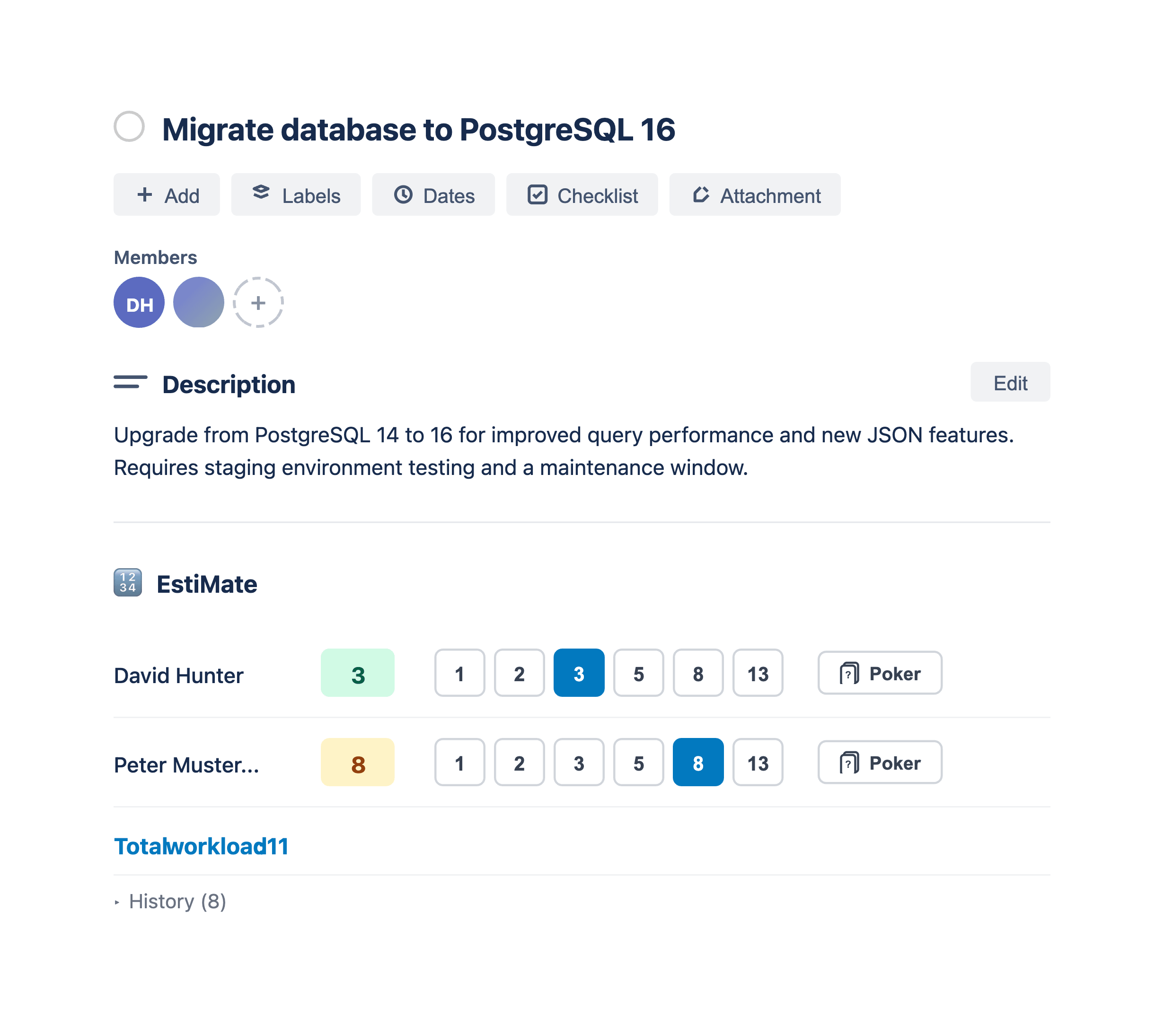
Per-Member Story Point Estimation
Assign story points to individual card members using Fibonacci quick-select buttons or free-text input. Each member gets their own estimate for crystal-clear workload tracking.
Fibonacci & Custom Estimation Scales
Fibonacci (1, 2, 3, 5, 8, 13) is built in with 6 quick-select buttons. Need a different scale? Premium lets you define a fully custom 6-value scale to match your scrum team's workflow.
Card Front Badges
Per-member estimate badges shown directly on card fronts. Optionally colorize badges by estimate size for quick visual scanning — both toggleable in settings.
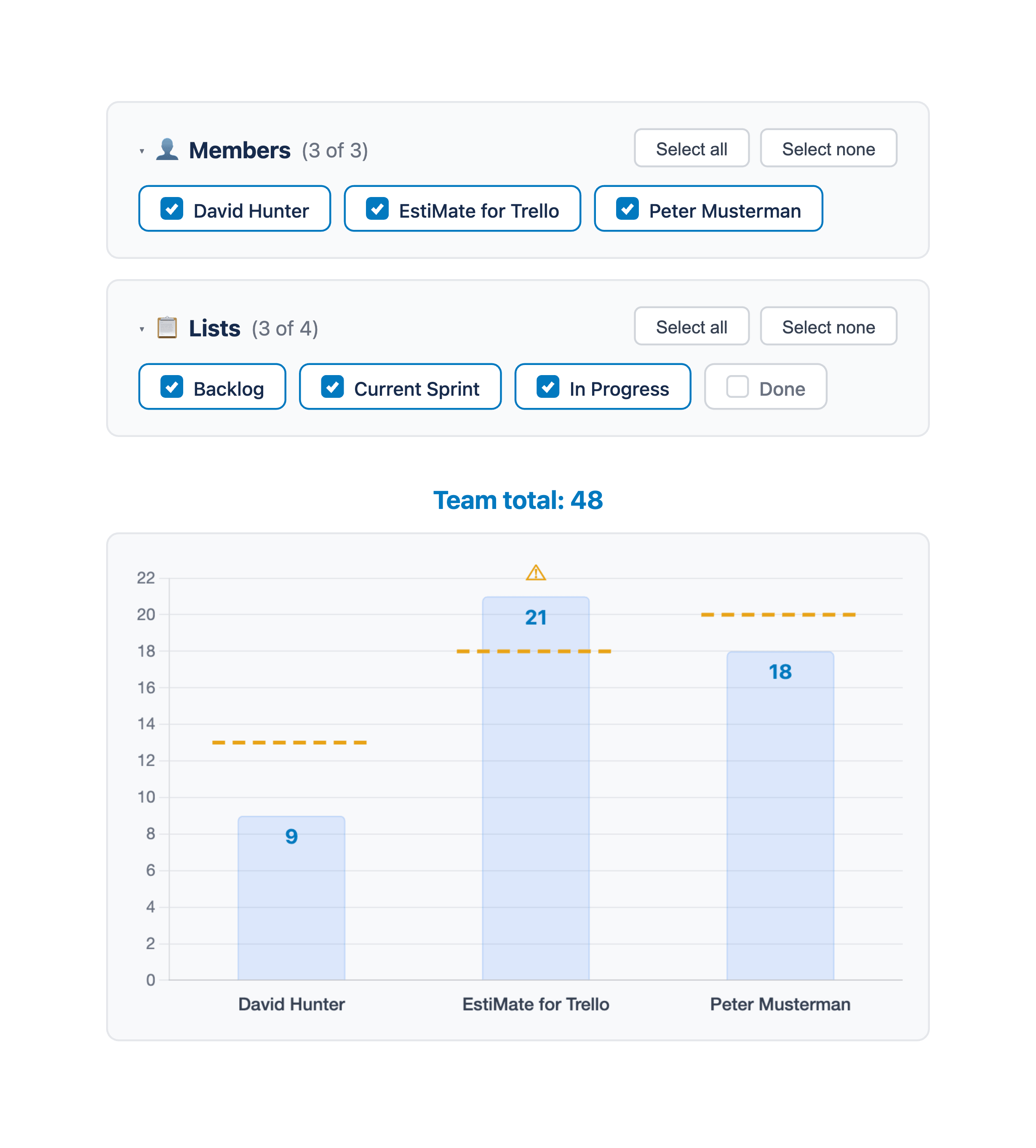
Team Workload Chart
Board-level bar chart with a Members/Lists toggle. View workload per member or per list with stacked member segments. Filter by lists and members to focus on current work.
Capacity Planning & Limits
Set per-member capacity limits that overlay the workload chart. Spot overallocation at a glance and keep your scrum sprints balanced and sustainable.
Zero Setup, Max Privacy
Works instantly with no sign-ups required. Your data never leaves Trello's secure environment — estimates are stored using Trello's own data layer.
Team Workload Chart with Capacity Limits
An interactive workload chart with Members and Lists views makes identifying bottlenecks in your project management workflow simple. Set capacity limits per member to ensure no one is overloaded, promoting a healthy and productive scrum team.
- — Red/green visual cues highlight who's at or over capacity.
- — Filter by list or member to focus on the current sprint.
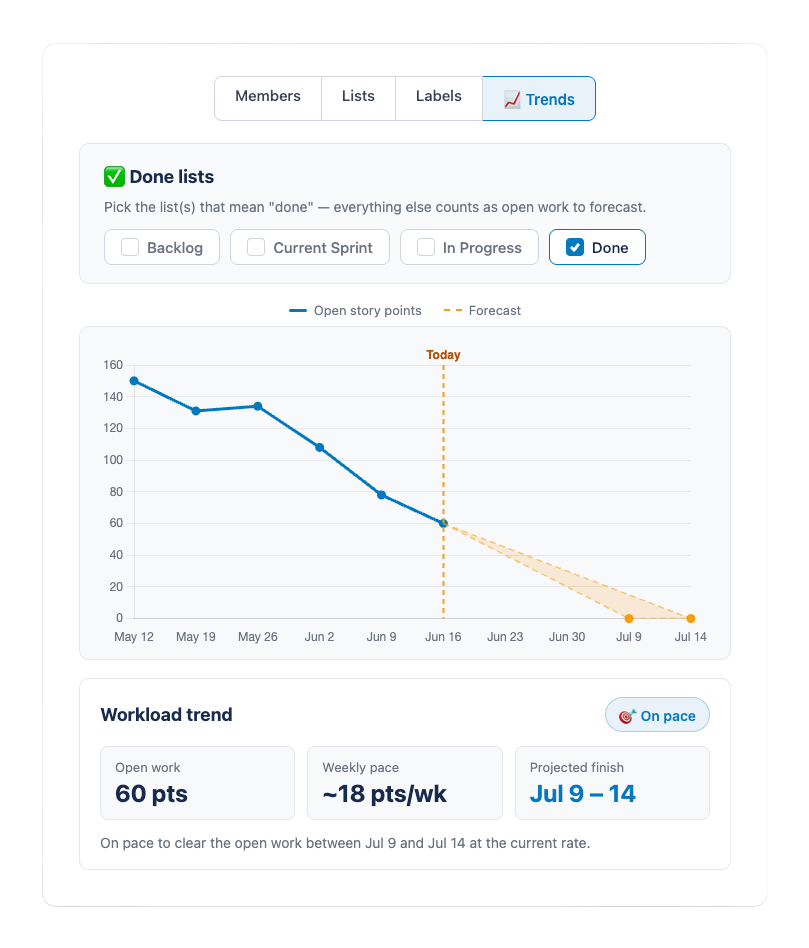
Workload Trends & Forecasting
Switch to the new Trends view to track your board's open story points over time, then let EstiMate forecast when the work will be done. It projects a realistic completion-date range from your team's recent pace — so you can finally answer the question every team gets asked: when will this be done?
- — See at a glance whether your workload is shrinking or growing.
- — Get a projected finish-date range — no sprints required, works for any team that estimates.
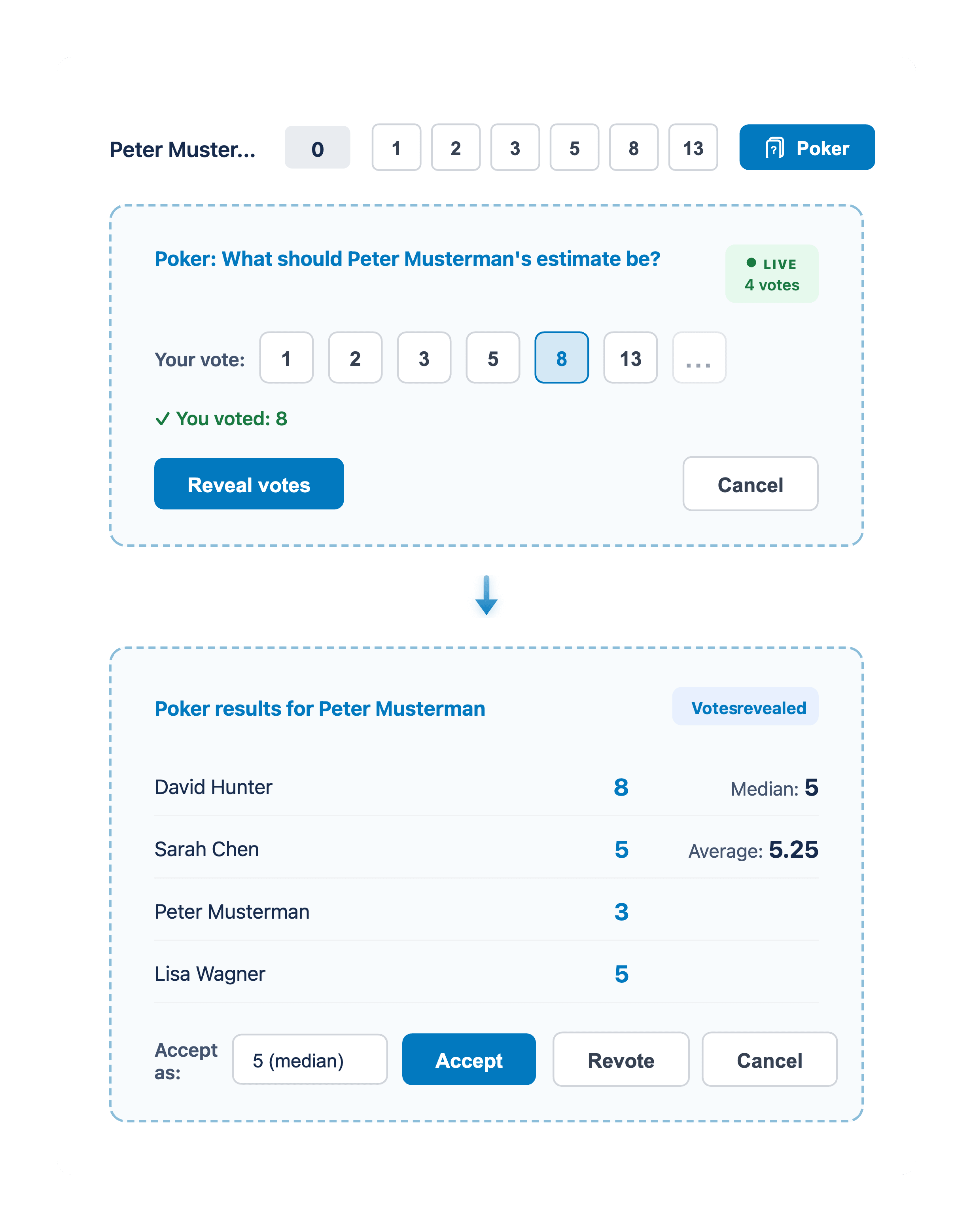
Planning Poker — Right Inside Trello
Run real-time planning poker sessions without leaving your Trello board. Team members vote privately, then estimates are revealed simultaneously — eliminating anchoring bias and driving consensus through scrum estimation best practices.
- — Hidden votes prevent anchoring bias for more honest scrum estimation.
- — Accept the median, revote, or pick a custom value after reveal.
Burndown Charts & Velocity Tracking
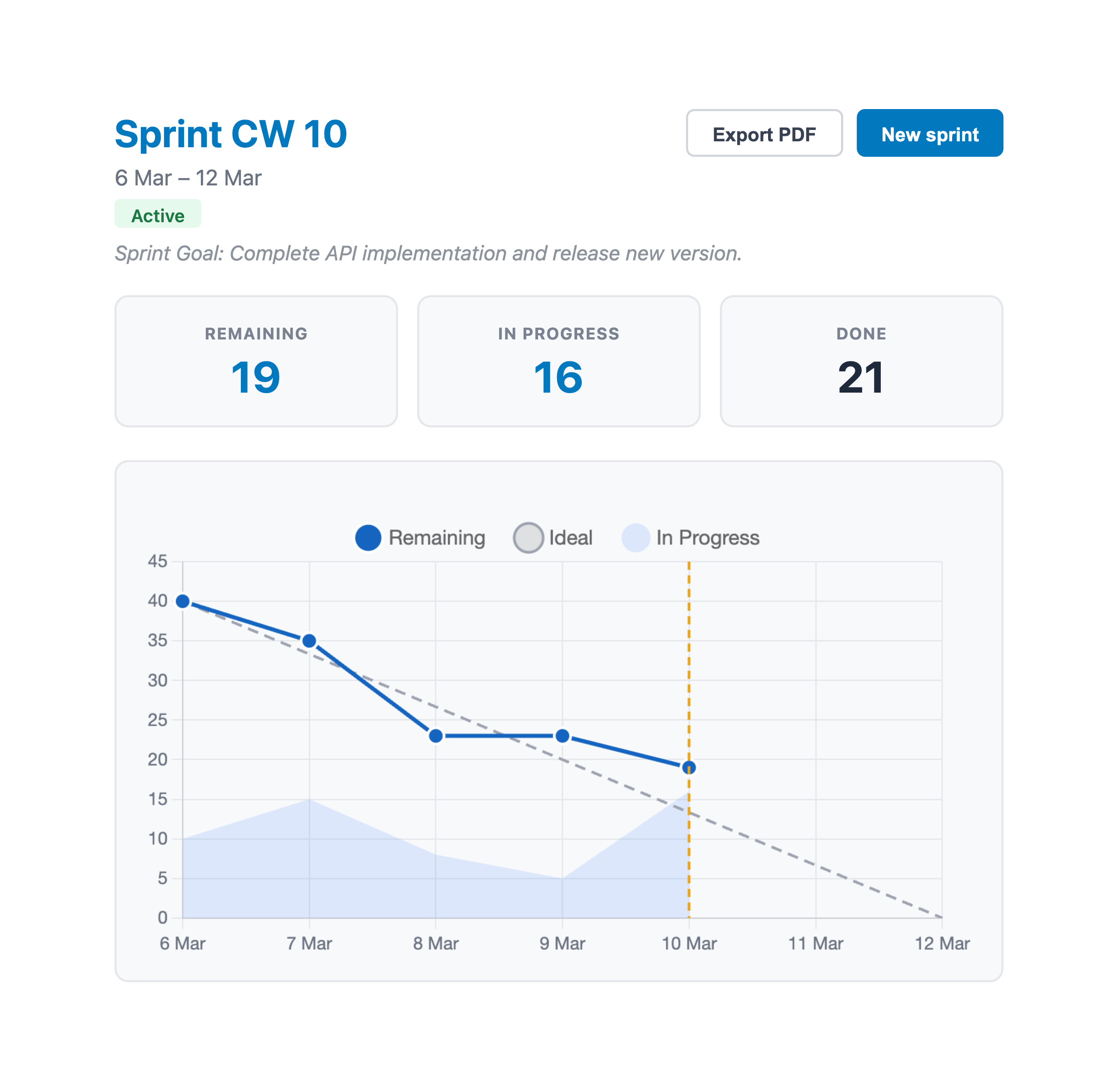
Track sprint progress with an auto-generated burndown chart that plots ideal, remaining, and in-progress work. Monitor team velocity across sprints to improve project management forecasting — essential data for every sprint review and retrospective.
- — Burndown chart updates daily from your Trello board data — no manual input.
- — Velocity bar chart with average trend line helps scrum teams plan realistic sprints.
Free vs. Premium
Get started for free with story point estimation and workload charts. Upgrade to unlock workload forecasting, sprint planning, burndown charts, planning poker, and velocity tracking.
| Features | Free | Premium |
|---|---|---|
| Card estimates — assign story points per card member | ✓ | ✓ |
| Team workload chart & capacity limits | ✓ | ✓ |
| Workload trends & forecasting | -- | ✓ |
| Sprint planning | -- | ✓ |
| Burndown chart & velocity tracking | -- | ✓ |
| Planning poker in real time | -- | ✓ |
| History of estimate changes | -- | ✓ |
| Custom estimation scales | -- | ✓ |
| Sprint PDF report export | -- | ✓ |
Premium features can be unlocked anytime from within the Power-Up.
Simple, Transparent Pricing
One subscription covers your entire board — every member benefits.
Yearly
$5.75/mo — save 28%
7 days free trial
- ✓ All premium features
- ✓ Whole board covered
- ✓ Cancel anytime
Have a license key? Activate it inside the Power-Up after installing EstiMate on your board.
Loved by Agile Teams
"Finally, a Trello Power-Up that understands multi-member estimation. The workload chart and burndown charts are game-changers for sprint planning and sprint reviews. Simple, fast, and indispensable."
— Alex M., Scrum Master
"The capacity limits feature helped us instantly spot overloaded team members. Our project management workflow is so much smoother now. Highly recommended."
— Jamie L., Project Manager
"I love that the data stays in Trello. Zero setup and planning poker built right in mean my team actually uses it, unlike other complex tools. Five stars for simplicity and power."
— Chris P., Team Lead
Frequently Asked Questions
Everything you need to know about story points, scrum estimation, and sprint planning with EstiMate.
What are story points in agile?
Story points are a unit of measure used in agile and scrum to estimate the effort or complexity of a user story or task. Rather than hours, teams assign relative values (commonly using the Fibonacci sequence: 1, 2, 3, 5, 8, 13) to reflect how much work a task involves. EstiMate lets you assign story points per card member directly inside Trello.
How does planning poker work?
Planning poker is a consensus-based estimation technique used in scrum. Each team member privately selects a story point value for a task, then all votes are revealed simultaneously. This avoids anchoring bias and encourages discussion when estimates differ. EstiMate includes built-in planning poker sessions right inside Trello cards.
What is a burndown chart?
A burndown chart is an agile project management tool that tracks remaining work (in story points) over the course of a sprint. It plots an ideal trend line against actual progress, helping scrum teams see whether they are on track to complete the sprint. EstiMate generates burndown charts automatically from your Trello board data.
What is sprint velocity in scrum?
Sprint velocity is the average number of story points a scrum team completes per sprint. It helps teams forecast how much work they can take on in future sprints. EstiMate automatically tracks velocity across up to 10 past sprints and displays it as a bar chart with an average trend line — no manual tracking needed.
Can I use EstiMate for sprint reviews and retrospectives?
Yes. EstiMate's burndown chart, velocity tracking, and sprint PDF report export give scrum teams the data they need for effective sprint reviews and retrospectives. Review remaining vs. completed work, compare velocity trends across sprints, and export a shareable PDF report — all from your Trello board.
Can I use EstiMate for free?
Yes! EstiMate's core features are completely free: per-member story point estimation, card front badges, team workload charts, and capacity limits. Premium features like sprint planning, burndown charts, velocity tracking, planning poker, and PDF reports are available starting at $5.75/month (billed yearly).
How is EstiMate different from other Trello estimation Power-Ups?
EstiMate is designed for per-member estimation — each card member gets their own story point value, giving you accurate individual workload tracking. Most other Power-Ups only support a single estimate per card. EstiMate also includes a team workload chart, capacity limits, sprint planning with burndown charts, planning poker, and velocity tracking — all inside Trello with zero setup.
We're All Ears
Got a feature idea, found a bug, or just want to say hi? Drop us a line — we read every message.
Email Us
Start Planning Smarter. Today.
Join scrum teams everywhere who use EstiMate for agile project management on Trello. Free to get started — upgrade anytime for sprint planning, planning poker, burndown charts, and velocity tracking.
Add EstiMate to Trello