
Guide
How to Estimate Story Points in Trello
A step-by-step guide to story point estimation for scrum teams using Trello. Learn what story points are, which scale to use, and how to turn estimates into actionable workload insights.
What are story points?
Story points measure the effort and complexity of a task relative to other work. Instead of guessing hours, the team asks: "How big is this compared to that login page we built last sprint?"
Sounds vague? It actually works better than time estimates. People are terrible at predicting hours but pretty good at comparing sizes. You know a card that says "redesign the settings page" is bigger than "fix the typo in the footer" without thinking about it.
Over a few sprints, story points give you something really useful: velocity. If your team consistently finishes around 40 points per sprint, you stop overcommitting. That number becomes your planning anchor.
Choosing an estimation scale
Most teams use the Fibonacci sequence: 1, 2, 3, 5, 8, 13. The gaps between numbers get bigger on purpose. When you're deciding between a 5 and an 8, there's no comfortable middle ground. That forces a real conversation about scope.
Some teams prefer T-shirt sizes (S, M, L, XL) or powers of 2. Honestly, the specific scale matters less than using it consistently. Pick one and stick with it for at least a few sprints before tweaking.
If you're just getting started, go with Fibonacci. It's the default for a reason.
Why estimate per member?
Most estimation tools give you one number per card. That's a problem.
Think about a typical feature card. A designer spends 3 points on mockups. A developer spends 8 on implementation. If the card just says "8", your workload chart makes the designer look idle and the developer look slammed. Neither is true.
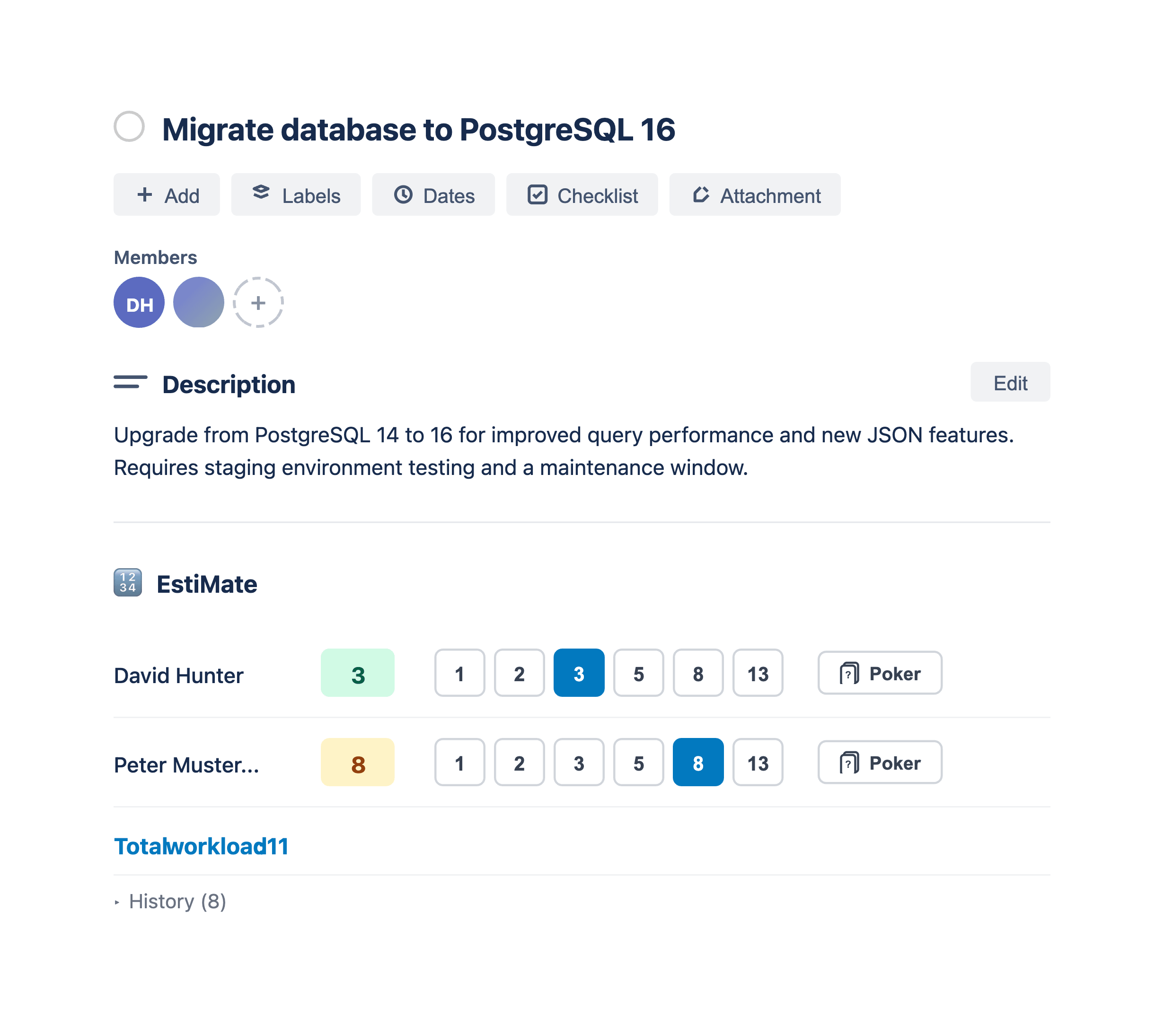
Per-member estimation fixes this. Each person on a card gets their own story point value, and the workload chart reflects what's actually going on. It's a small change that makes sprint planning significantly less painful, especially on cross-functional teams.
Step-by-step: estimating story points in Trello
Trello doesn't have a built-in story point field, so you need a Power-Up. We'll walk through the setup with EstiMate, which handles per-member estimation out of the box.
1. Install the Power-Up
Add EstiMate to your board. No sign-up, no configuration. It just works.
2. Assign members to cards
Add the right people to each card. EstiMate picks up the member list automatically and creates an estimation row for each person.
3. Open a card and set estimates
Open any card and scroll to the EstiMate section. You'll see each member with a row of buttons (1, 2, 3, 5, 8, 13 on Fibonacci). Click a value. Done.
The card total updates automatically, and it shows up as a badge on the card front. No need to open every card to see where things stand.
4. Review workload distribution
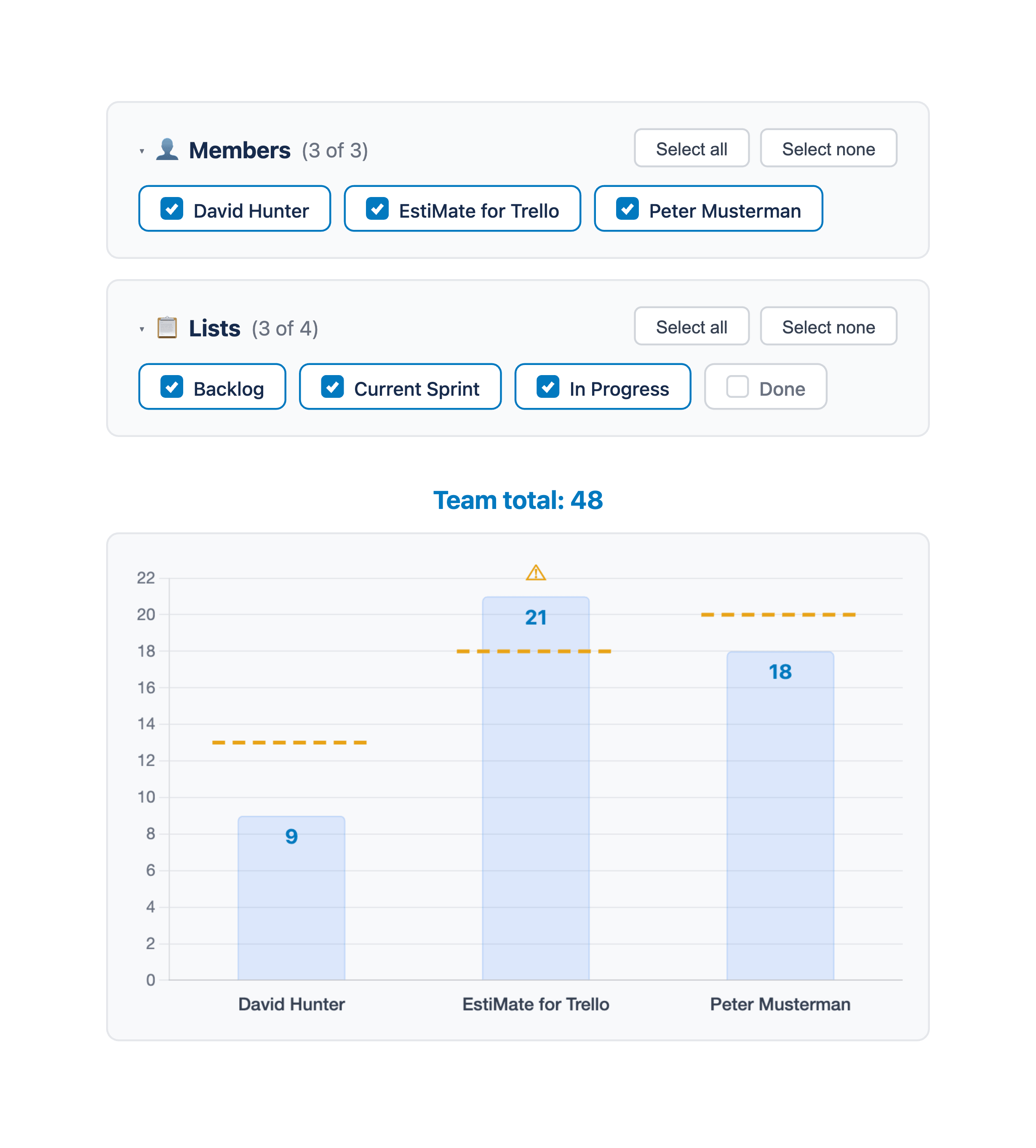
Open the team workload chart from the board menu. It shows a bar for each member with their total points. You'll immediately see if someone has 40 points while everyone else has 15.
5. Set capacity limits (optional)
You can set a point limit per team member. The chart draws a threshold line so it's obvious when someone is overloaded. Really helpful if you have people working part-time or split across teams.
Mistakes that trip up most teams
Treating points as hours. If "5 points" always means "5 hours" to your team, you're just doing time estimation with extra steps. Points should capture complexity and unknowns, not clock time. A 5-point task might take 2 hours on a good day or a full day if you hit unexpected issues.
The senior dev always wins. When the tech lead says "this is a 3", everyone nods. Even if half the team thinks it's an 8. This is called anchoring bias, and it's the whole reason planning poker exists. Private votes first, discussion after.
Debating for 20 minutes whether something is a 5 or 8. Stop. It doesn't matter that much. Give yourselves 2 minutes per card, pick a number, and move on. Your estimates get more accurate over time anyway.
Estimating and never looking back. At the end of each sprint, take 5 minutes to compare estimates vs. actuals. Were the 8-pointers really harder than the 5s? This is the feedback loop that makes future estimates better.
From estimates to sprint planning
Story points become really powerful once you've collected a few sprints of data. At that point you can:
- Plan capacity using your average velocity instead of gut feeling
- Track progress mid-sprint with a burndown chart
- Catch problems early - if you're behind the ideal line at the midpoint, it's time to cut scope, not hope for a miracle
- Get better at forecasting by comparing velocity across sprints
That's when estimation stops being a ritual and starts actually helping you ship.
Getting started
Don't overthink it. Fibonacci scale, per-member estimates, quick retro at the end of each sprint. You'll be surprised how fast the numbers start making sense.
Add EstiMate to your Trello board - it's free, takes 10 seconds to set up, and works with whatever workflow you already have.
Keep reading
- Planning Poker in Trello - run estimation sessions that avoid anchoring bias
- Trello Sprint Planning Guide - turn your estimates into a sprint plan
- Burndown Charts for Trello - track progress and spot problems early
- How to Set Up Trello for Scrum - board structure, ceremonies, and common pitfalls
- How to Track Team Velocity in Trello - measure and use your team's sprint velocity
- Capacity Planning for Trello Teams - plan sprint capacity based on team availability
- What 1,000 Trello Teams Taught Me About Estimation - patterns I keep noticing across teams
Ready to start estimating?
EstiMate adds story points, workload charts, and sprint planning to Trello. Free to get started.
Add EstiMate to Trello