
Guide
Trello Sprint Planning Guide
How to set up and run scrum sprints on a Trello board - from board structure to burndown charts and velocity tracking.
Can you actually do sprints in Trello?
Trello wasn't built for scrum. There's no sprint backlog, no burndown chart, no velocity tracker. It's a kanban tool at heart.
But a lot of teams use Trello anyway - because it's simple, visual, and everyone already knows how to use it. And with the right board structure and a Power-Up or two, you can run proper sprints without switching to Jira or Linear.
This guide walks through setting up a Trello board for sprint planning, running the sprint, tracking progress, and closing it out. No complicated setup. No plugins that take over your whole board.
Board structure for sprints
Keep it simple. You need these lists at minimum:
- Backlog - everything that needs doing, roughly prioritized
- Sprint Backlog (or "To Do") - cards committed to the current sprint
- In Progress - actively being worked on
- Done - finished work
Some teams add a "Review" or "QA" column between In Progress and Done. That's fine. Just don't go overboard - five lists is usually the sweet spot. More than that and people start losing track of what goes where.
The key thing: your Backlog stays separate from the sprint. During planning, you pull cards from Backlog into Sprint Backlog. Cards that don't get done go back to Backlog (or stay for the next sprint, depending on your team's preference).
Sprint planning in practice
Sprint planning is where your team decides what to work on for the next 1-2 weeks. It doesn't have to be a long meeting. 30 minutes works for most teams.
Before the meeting
Make sure your Backlog cards are estimated with story points. If they're not, you're going to spend the whole meeting arguing about sizes instead of picking work. Do a quick estimation session beforehand - even 15 minutes knocking out the top 10 cards saves a lot of time.
During the meeting
Look at your team's velocity - how many points you finished in the last sprint (or the average of the last 3). That's your budget.
Pull cards from the top of the Backlog into Sprint Backlog until you hit that number. If your team averages 35 points, don't pull in 50 because "this sprint feels different." It doesn't.
Check the workload chart. Are the points spread evenly across the team, or is one person carrying 60% of the load? This is the moment to rebalance, not midway through the sprint when it's too late.
Set a sprint goal
One sentence that describes what the team is trying to achieve. "Finish the checkout flow" or "Get the reporting dashboard to beta." It sounds small but it helps a lot when you need to decide whether to add or cut scope mid-sprint. If a new request doesn't serve the sprint goal, it goes to the Backlog.
Setting up sprint tracking in Trello
Trello alone won't track your sprint. You can eyeball the Done column, but that's about it. For actual sprint tracking - burndown charts, remaining points, daily progress - you need a Power-Up.
With EstiMate, the setup looks like this:
- Name your sprint and set start/end dates
- Map your Trello lists to sprint stages (which list is "To Do", which is "In Progress", which is "Done")
- Optionally add a sprint goal
That's it. EstiMate reads the story points from your cards and starts tracking daily snapshots. No manual data entry.
Reading your burndown chart
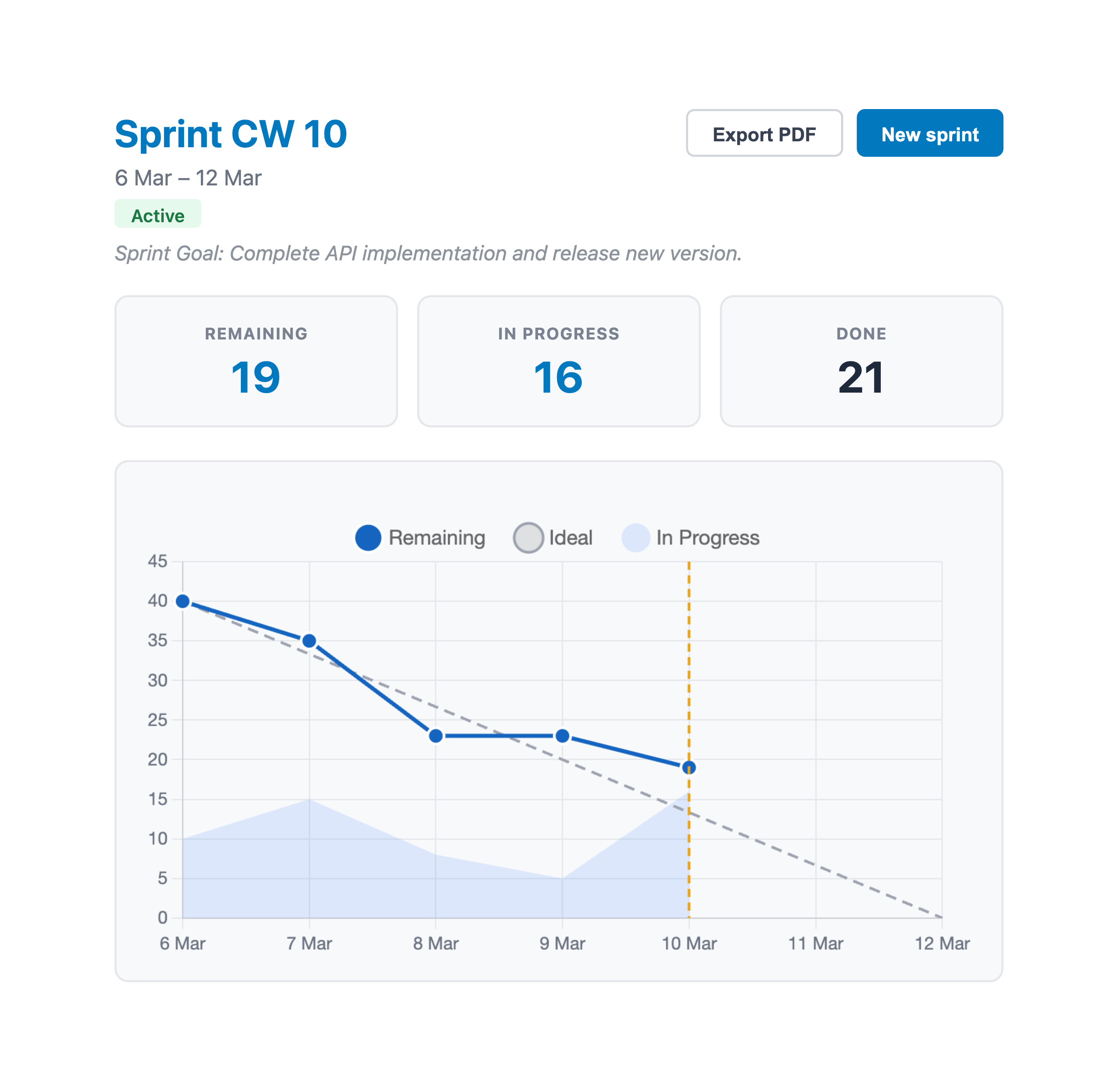
A burndown chart plots remaining story points over time. Two lines:
- Ideal line - a straight diagonal from total points down to zero. This is what "perfectly on track" looks like.
- Actual line - where you really are, updated daily
If the actual line is above the ideal line, you're behind. If it's below, you're ahead.
The chart is most useful around the midpoint of the sprint. Early on, it's too noisy to mean much. But if you're 5 days into a 10-day sprint and the line is barely moving, that's a real signal. Time to cut scope or re-prioritize.
Don't panic over one bad day. Look at the trend over 2-3 days. Sometimes a developer finishes three cards on Thursday that were "almost done" since Tuesday. That's normal.
Velocity: your planning superpower
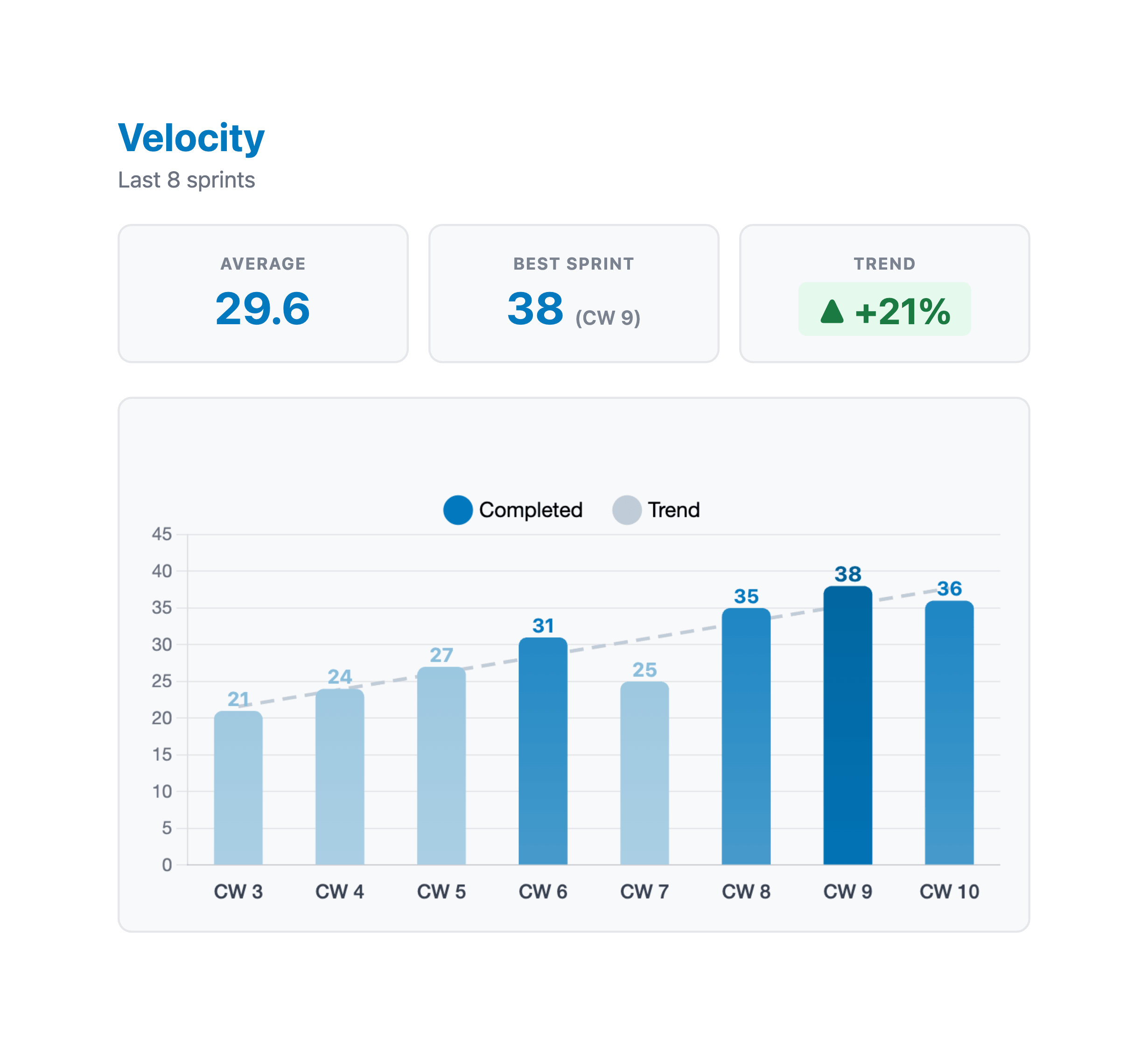
Velocity is just the number of story points your team completes per sprint. Track it over time and you get a surprisingly reliable forecasting tool.
After 3-4 sprints, your average velocity stabilizes. If it's 38 points, plan for 38 points. Not 45 because the team "should be able to stretch." Not 30 because you're being conservative. Just use the number.
Where velocity gets really interesting is spotting trends. Three sprints in a row with declining velocity? Something's wrong - maybe too many meetings, unclear requirements, or growing tech debt. Rising velocity after a process change? Whatever you did, keep doing it.
Closing the sprint
When the sprint end date arrives:
- Count the points in Done. That's your completed velocity for this sprint.
- Cards still in Sprint Backlog or In Progress? Decide: do they roll into the next sprint, or go back to the Backlog for re-prioritization?
- Export a PDF report if you need it for a sprint review or retro.
Then start fresh. Create a new sprint, pull in the next batch of cards, and go again.
A quick tip: resist the urge to carry over a huge pile of unfinished work. If you consistently have 15 points of leftovers, your sprint commitment is too high. Reduce it by 15 next time and see what happens.
Common sprint planning pitfalls
No estimates before planning. The meeting turns into an estimation session, which takes 3x longer and produces worse results because everyone's tired. Estimate before you plan.
Ignoring the workload chart. Total points might look right, but if one developer has 25 points and another has 5, you have a problem. Check individual loads.
Sprints that are too long. Two weeks is the standard for good reason. One-week sprints are exhausting (too much ceremony overhead). Three-week sprints lose urgency. Start with two weeks and only change if you have a specific reason.
No sprint goal. Without one, every task feels equally important. When someone asks "can we squeeze in this bug fix?", there's no framework for deciding. With a sprint goal, the answer is easy: does it help us finish the checkout flow? No? It waits.
Getting started
You don't need to change your whole process at once. Start with the basics: set up your lists, estimate your cards, and run one sprint. See how it feels. Adjust from there.
Add EstiMate to your Trello board to get story points, sprint tracking, burndown charts, and velocity - without leaving Trello.
Keep reading
- How to Estimate Story Points in Trello - get your cards estimated before planning
- Burndown Charts for Trello - read the chart patterns and react to them
- Planning Poker in Trello - run team estimation sessions without anchoring bias
- How to Set Up Trello for Scrum - board structure, ceremonies, and common pitfalls
- How to Track Team Velocity in Trello - measure and use your team's sprint velocity
- Capacity Planning for Trello Teams - plan sprint capacity based on team availability
- What 1,000 Trello Teams Taught Me About Estimation - patterns I keep noticing across teams
Ready to run your first sprint in Trello?
EstiMate adds sprint planning, burndown charts, and velocity tracking to your Trello board. Free to get started.
Add EstiMate to Trello