
Guide
How to Set Up Trello for Scrum
A practical guide to building a scrum board in Trello - lists, labels, sprint workflow, estimation, ceremonies, and the mistakes most teams make.
Why Trello works for scrum
Trello isn't a scrum tool. It's a board with lists and cards. But that's kind of the point.
Most scrum tools give you a hundred fields, mandatory workflows, and admin panels that need their own admin panel. Trello gives you a blank canvas. You set it up the way your team actually works, not the way some product manager imagined you might work.
If your team is small to mid-size - say 3 to 10 people - and you want agile without the overhead, Trello is a solid choice. You just need to set it up right.
The board structure
Start with five lists:
- Backlog - everything that could be worked on eventually. This is your product backlog. Cards here are roughly prioritized but not committed to any sprint.
- Sprint Backlog - cards committed to the current sprint. During sprint planning, you pull cards from Backlog into here.
- In Progress - cards someone is actively working on. When a developer picks up a card, they move it here and assign themselves.
- In Review - cards that are done but need a review, QA pass, or sign-off. Skip this list if your team doesn't have a review step.
- Done - finished work. Cards that are complete by whatever "done" means for your team.
That's the basic setup. Some teams add a "Blocked" list. Others use labels for that instead of a separate column. Start simple - you can always add columns later if you feel the need.
Labels for categorization
Labels are underrated on scrum boards. Use them to tag card types:
- Bug (red) - something broken
- Feature (green) - new functionality
- Tech debt (yellow) - cleanup, refactoring, upgrades
- Spike (blue) - research or investigation
This makes it easy to scan the board and see what kind of work is in flight. If your Done column is all bugs and no features for three sprints in a row, that's a conversation worth having.
You can also use labels for priority (P1/P2/P3), but don't double up. Pick either card type or priority - not both - or labels become noise.
Running sprints
A sprint is a fixed time box - usually one or two weeks. Here's the basic rhythm:
Sprint planning. Pull cards from the Backlog into Sprint Backlog. Don't grab everything - only what the team can realistically finish. This is where estimation matters. If you're not estimating, you're guessing how much fits, and you'll guess wrong.
During the sprint. Cards move left to right: Sprint Backlog, In Progress, In Review, Done. That's it. The board tells you the status of everything at a glance. No status meetings needed - walk the board right to left in standup and you're done in five minutes.
End of sprint. Review what got done, archive the Done cards (or move them to a separate "Archive" list), and reset for the next sprint.
Trello doesn't have built-in sprint support, so you'll need to manage the cadence yourself or use a Power-Up that handles sprint planning for you.
Estimating work
Without estimates, sprint planning is just vibes. You can't answer "how much can we take on this sprint?" without knowing how big the cards are.
Most scrum teams use story points - relative size estimates on a Fibonacci scale (1, 2, 3, 5, 8, 13). A 1 is trivial. A 13 is a monster that probably needs to be broken down.
The key insight: points measure complexity, not hours. A 5-point card isn't "5 hours of work." It's "about twice as complex as a 3." This sounds fuzzy at first, but it calibrates fast once the team has a few sprints under their belt.
For faster, more accurate estimates, try planning poker - everyone votes independently, then you discuss the outliers. It avoids the anchoring problem where the first person to speak sets the number for everyone else.
Tracking progress
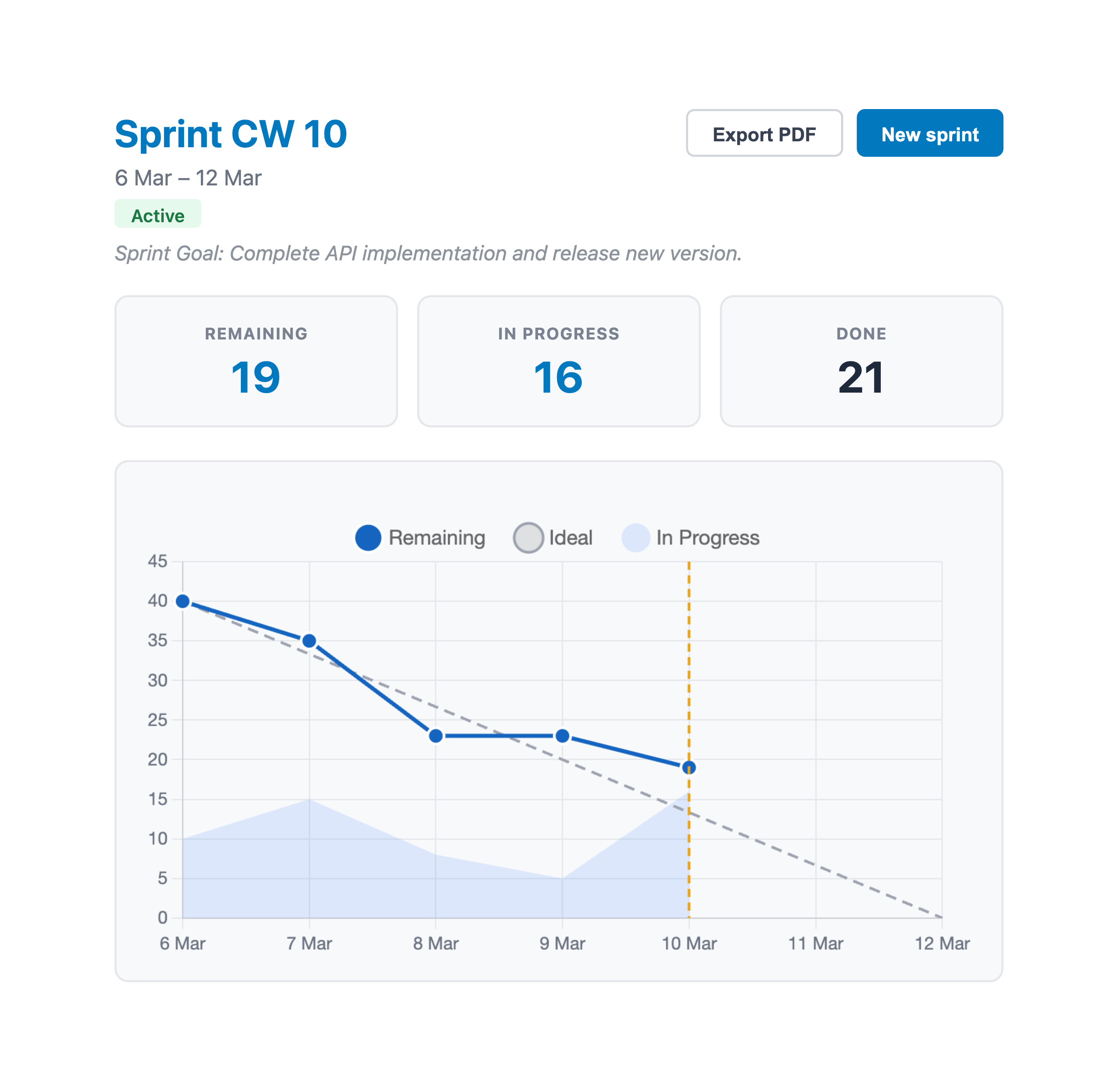
Once your sprint is running, you need to know if you're on track. Counting cards in the Done column works for about a day. After that, you need a burndown chart.
A burndown chart plots remaining work over time. If the line is below the ideal diagonal, you're ahead. If it's above, you're behind. Simple.
Velocity - how many points your team completes per sprint - is the other number worth tracking. After 3-4 sprints, your velocity stabilizes and becomes the best input for sprint planning. Instead of guessing capacity, you use last sprint's velocity as a baseline.
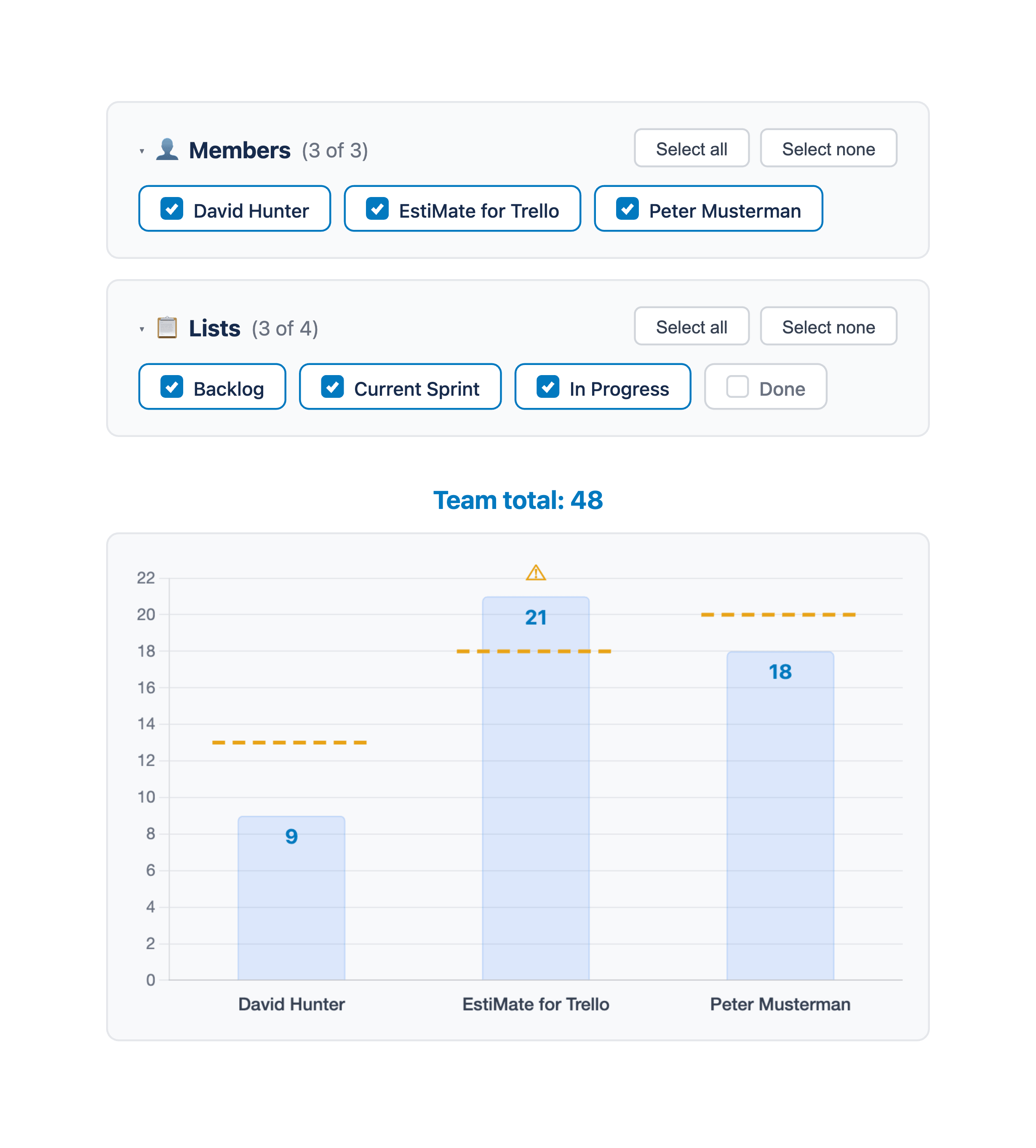
Trello doesn't have native burndown charts or velocity tracking. EstiMate adds both, along with per-member estimation, workload charts, and sprint management - all reading directly from your board data.
Mapping scrum ceremonies to Trello
Scrum has a handful of ceremonies. Here's how they map to a Trello board:
- Sprint planning - drag cards from Backlog to Sprint Backlog. Estimate anything that doesn't have points yet. Commit to a realistic amount based on your velocity.
- Daily standup - walk the board right to left. Start with In Review, then In Progress, then Sprint Backlog. "Anything blocked?" is the only question that matters.
- Sprint review - pull up the Done column and walk through what was completed. Cards are your agenda.
- Retrospective - use a separate Trello board with three lists: What went well / What didn't / Action items. Or just have the conversation - not everything needs a board.
Common pitfalls
The Done list grows forever. Archive cards after each sprint. A Done column with 200 cards helps nobody.
No WIP limits. If every team member has 4 cards In Progress, nothing is getting finished. Set an informal limit - two cards per person max - and enforce it during standup.
Skipping estimation. "We'll just see how it goes" means you'll overcommit every sprint and burn out by month three. Even rough estimates are better than none.
One giant backlog. If your Backlog has 300 cards and nobody has looked at the bottom 250 in six months, it's not a backlog - it's a graveyard. Prune it quarterly. If a card has been sitting untouched for three months, delete it. If it matters, it'll come back.
Not using the board in standup. If people report status verbally while the board sits in another tab, you're doing it wrong. Share the screen. Walk the columns. Let the board be the single source of truth.
Getting started
Set up the five lists, add some labels, estimate your first batch of cards, and run a sprint. Don't overthink it - the whole point of scrum on Trello is that it's lightweight. You can always refine the process after a few iterations.
If you want estimation, workload tracking, and burndown charts without leaving Trello, give EstiMate a try - it's free to get started.
Keep reading
- How to Estimate Story Points in Trello - choosing scales and estimating per member
- Trello Sprint Planning Guide - set up sprints, velocity tracking, and more
- Planning Poker in Trello - run estimation sessions that avoid anchoring bias
- Burndown Charts for Trello - track progress and spot problems early
- How to Track Team Velocity in Trello - measure and use your team's sprint velocity
- Capacity Planning for Trello Teams - plan sprint capacity based on team availability
- What 1,000 Trello Teams Taught Me About Estimation - patterns I keep noticing across teams
Run scrum in Trello with real estimation and sprint tracking
EstiMate adds story points, planning poker, burndown charts, and velocity tracking to your Trello board. Free to get started.
Add EstiMate to Trello