
Guide
Capacity Planning for Trello Teams
How to figure out what your team can actually take on in a sprint - and stop overcommitting every time.
The overcommitment problem
Here's a scene that plays out in most sprint planning meetings: the team looks at velocity from the last sprint, pulls in roughly the same amount of work, and starts the sprint. Two days in, someone mentions they're on vacation Thursday and Friday. Someone else has a dentist appointment and a company workshop. By mid-sprint, it's clear that half the committed work won't get done.
The problem isn't that the team is slow. The problem is that nobody checked how much time the team actually has this sprint. Velocity tells you what the team did last sprint - capacity tells you what the team can do this sprint.
What capacity actually means
Capacity is the total amount of work your team can realistically handle in an upcoming sprint, given who's available and for how long. It's not a fixed number - it changes every sprint based on vacations, holidays, meetings, part-time schedules, and everything else that eats into focused work time.
Think of it this way: velocity is what happened. Capacity is what's possible. A team that averages 30 points per sprint with everyone present might only have capacity for 20 points when two people are out for half the sprint.
Calculating capacity in story points
There are two common approaches. The simple one works for most teams.
The simple approach: take your average velocity, then adjust down for any known availability gaps. If your team normally does 30 points with 5 members and one person is out for the full sprint, plan for roughly 24 points (30 minus about 20%). It's not precise, but it's better than ignoring availability entirely.
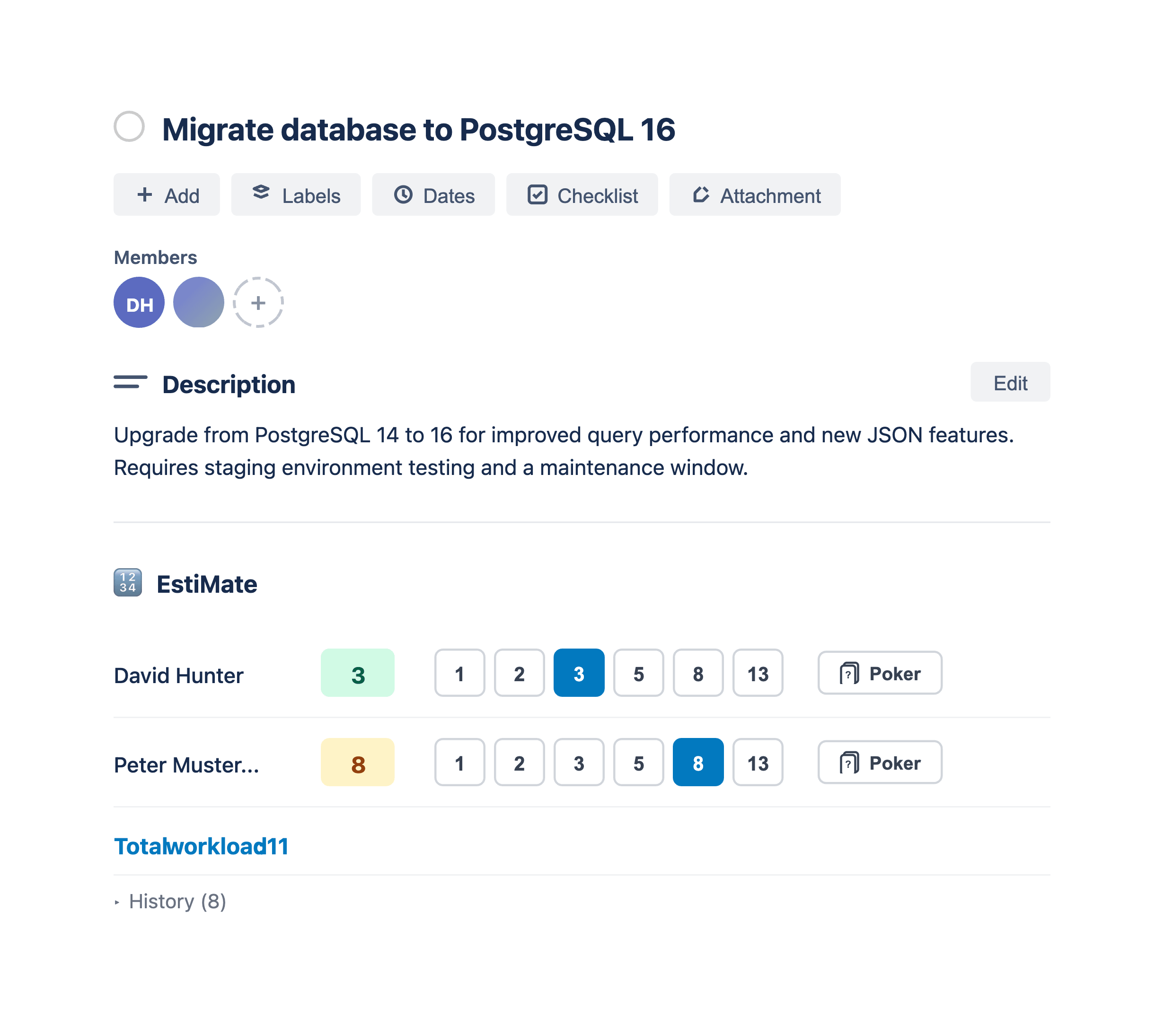
The per-member approach: assign each team member a capacity in story points based on their availability. If someone normally handles about 8 points per sprint but is only available 3 out of 5 days, their capacity for this sprint is roughly 5. Add up everyone's individual capacity and that's your team's sprint capacity.
The per-member approach takes more effort upfront but catches problems that the simple approach misses - like when your most experienced developer is out the same week as a critical deadline.
The availability factors people forget
Vacation days and holidays are obvious. But there's a long list of things that reduce capacity that teams routinely ignore:
- Meetings. Sprint planning, retrospectives, demos, one-on-ones, all-hands. A developer with 6 hours of meetings in a week has less capacity than one with 2 hours.
- Support rotation. If someone is on-call or handling support tickets this sprint, their capacity for planned work drops significantly.
- Context switching. Working on 3 projects at once doesn't give you 33% capacity on each. It's more like 20% after the cost of switching.
- Onboarding. A new team member doesn't have full capacity yet. They also reduce someone else's capacity because they need help getting up to speed.
- Part-time schedules. Contractors, part-time team members, or people split across teams need explicit capacity allocations.
You don't need to track all of this precisely. But the sprint planning conversation should at least ask: "Does anyone have anything unusual this sprint that affects their availability?"
Capacity vs. velocity - when to use which
Use velocity as your baseline. Use capacity as your adjustment.
In a normal sprint where everyone is around and nothing unusual is happening, velocity is all you need. Your average velocity already accounts for the team's typical meeting load, normal interruptions, and usual pace.
Capacity planning kicks in when this sprint is different from a normal sprint. Someone's on vacation. There's a company event. A team member is splitting time with another project. That's when you need to adjust down from the velocity baseline.
The formula is simple: start with your average velocity, then subtract proportionally for any missing capacity. If you normally have 5 full-time people and this sprint you effectively have 4, plan for about 80% of your average velocity.
Spotting overallocation
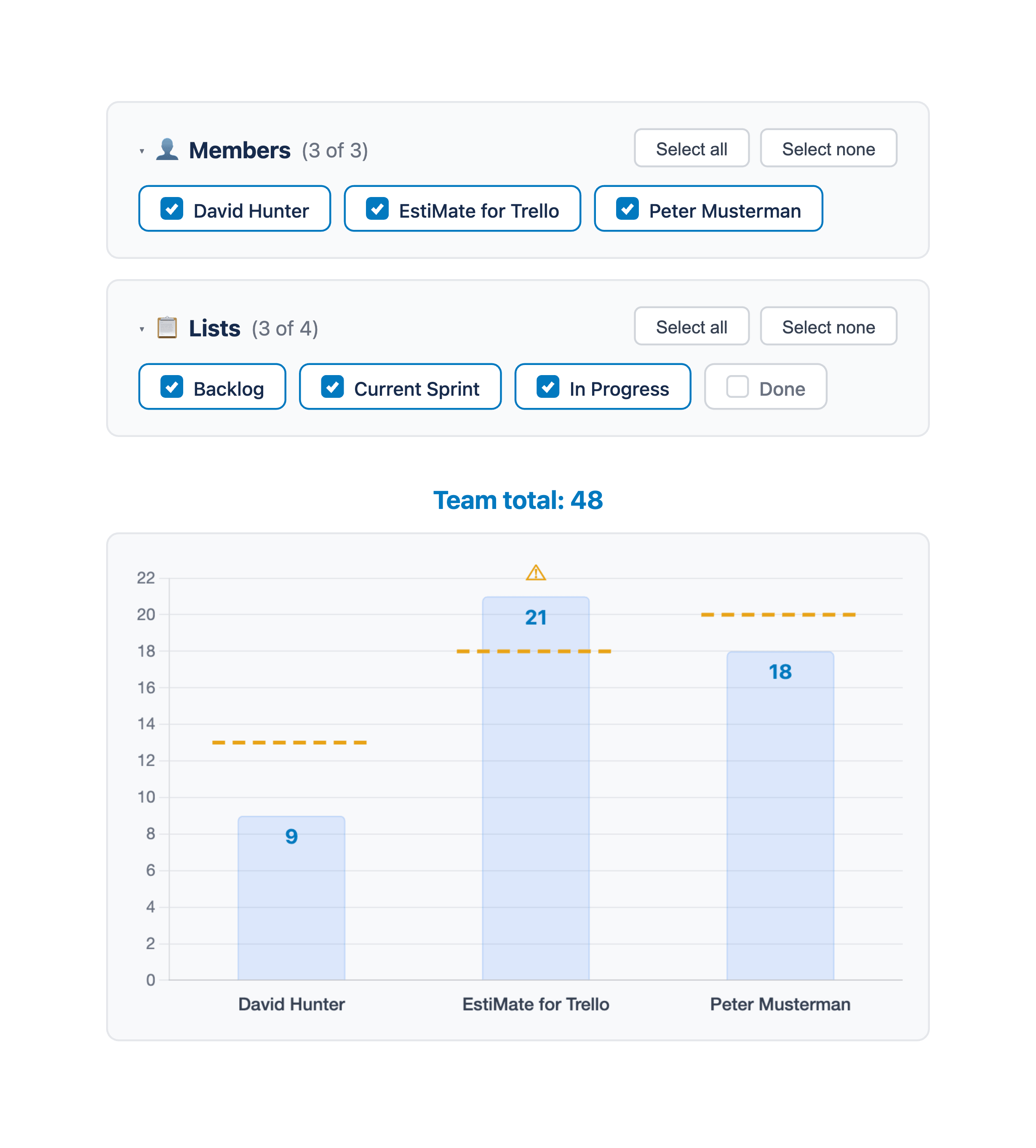
Even when total team capacity looks fine, individual members can be overloaded. This is the sneaky failure mode of capacity planning - the team has 30 points of capacity and commits to 28 points, but 15 of those points are assigned to one person who can only handle 8.
Per-member workload visibility is the fix. During sprint planning, you want to see not just the total points committed but how they're distributed across the team. If one person's bar is way above their capacity line while others have room, redistribute before the sprint starts - not three days in when it's too late.
The 80% rule
Here's a practical guideline that saves a lot of grief: never plan above 80% of your theoretical maximum capacity. If your team could theoretically handle 35 points, plan for 28.
That 20% buffer isn't slack - it's reality. Bugs show up. Production issues happen. Estimates are wrong. A task that looked like a 3 turns out to be a 5. The teams that consistently finish their sprints aren't the ones that plan perfectly - they're the ones that leave room for the unexpected.
If the team finishes early, they can always pull more work from the backlog. That feels way better than scrambling to drop scope at the end of every sprint.
Making it part of sprint planning
Capacity planning doesn't need to be a separate ceremony. It's a 5-minute check at the start of sprint planning:
- Look at your average velocity from the last few sprints
- Go around the room: "Any vacation days, half-days, or schedule conflicts this sprint?"
- Adjust the target down if needed
- Pull in work up to that adjusted target, checking per-member distribution as you go
That's it. No spreadsheets, no complex formulas. Just a quick reality check before you start pulling cards.
Capacity planning in Trello
Trello doesn't have built-in capacity tracking, which is why most teams end up eyeballing it. But with the right setup, you can make it visual.
EstiMate adds per-member capacity limits to the workload chart. You set each person's capacity in story points, and the chart shows their assigned workload as a bar against that limit. If someone's bar goes past their capacity line, you can see it instantly and rebalance before the sprint starts.
Combined with velocity tracking and burndown charts, it gives you the full picture: what the team has done historically, what they can take on this sprint, and how they're tracking day by day.
Keep reading
- How to Forecast When Your Project Will Be Done in Trello - the projection your capacity numbers adjust
- How to Track Team Velocity in Trello - use velocity as your capacity baseline
- Trello Sprint Planning Guide - the full sprint planning workflow
- How to Estimate Story Points in Trello - the estimation step that feeds capacity planning
- Burndown Charts for Trello - track day-by-day progress within each sprint
- Planning Poker in Trello - get better estimates with team voting sessions
- How to Set Up Trello for Scrum - board structure, ceremonies, and common pitfalls
- What 1,000 Trello Teams Taught Me About Estimation - patterns I keep noticing across teams
See your team's workload before the sprint starts
EstiMate adds per-member capacity limits, workload charts, and sprint planning to your Trello board. Free to get started.
Add EstiMate to Trello