
Guide
How to Forecast When Your Project Will Be Done in Trello
The honest way to answer "when will this be done?" -- open work divided by your recent pace, projected to a finish-date range you can defend. No sprints required.
The Friday question
It's Friday afternoon. You're on a status call, or a client emails, or your boss leans over and asks the one question that never gets easier: "So when will this be done?"
And the honest answer is a shrug.
You know roughly how much is left, and you have a feel for how fast the team moves. But turning that into a date -- one you'd say out loud to someone who'll remember it -- feels like a trap. Say too soon and you miss it; say too late and you look slow. So you hedge: "Couple more weeks, probably." Everyone nods, nobody believes it, and you have the same conversation again next Friday.
There's a better way, and it doesn't need a spreadsheet or a fortune teller. It just needs your board to know two things: how much work is left, and how fast you've been getting through it. If you estimate your cards, you have both.
The whole forecast fits on a napkin
Take the work that's left, divide it by how fast you've been getting through it lately, and that's your finish window. Two numbers are the whole game:
- Open work. The sum of the estimates on everything not finished yet -- backlog, in-progress, the cards nobody has touched in a while.
- Recent pace. How many points you've actually been clearing per week, over a recent window rather than your all-time best.
If you have 120 story points of open work and you've been closing about 30 a week, that's roughly four weeks -- math you can do in your head during the call.
It's the same mental model as a burndown chart, just stretched past one sprint: a sprint burndown asks "will we finish by Friday?" while a completion forecast asks "at this pace, when does the whole pile hit zero?" The backbone is velocity -- the work your team actually completes over time. Velocity is what happened; a forecast is just velocity pointed forward.
The catch is that both numbers move. The remaining total changes every day, and your pace isn't fixed either -- so doing this by hand every Friday is the kind of chore that gets skipped after the second week. The trick isn't the arithmetic; it's capturing the data automatically so it's always current.
Why the honest answer is a range, not a date
Your pace is never one clean number. Some weeks you clear 50 points, some weeks a production incident eats three days and you clear 20. So an honest forecast doesn't say "done July 11." It says "on pace to finish between July 9 and July 14" -- a window built from your slower recent pace on one end and your faster pace on the other. Anyone who hands you one exact date is either guessing or lying.
And a range is more useful on that Friday call anyway. "Second week of July, assuming nothing new lands" is a sentence you can defend; "July 11" is one you'll end up apologizing for -- the same reason knowing your velocity sits between 25 and 35 beats any single sprint's number.
How a net-burn forecast works in Trello
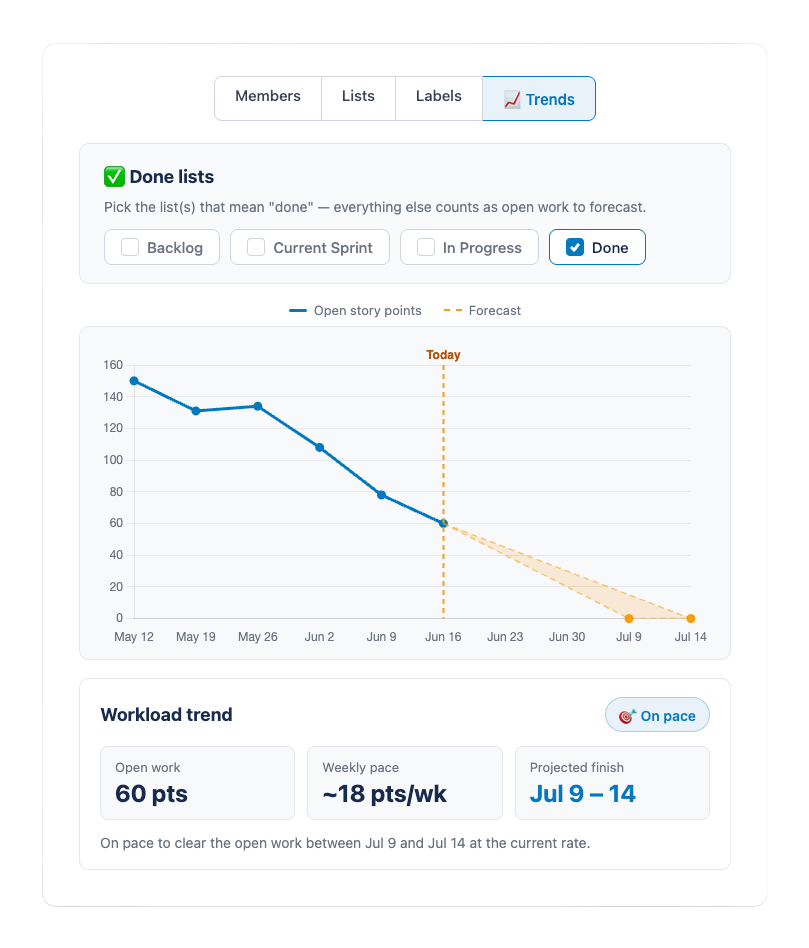
This is the approach behind the Trends view in EstiMate, and it's worth understanding even if you never turn it on, because the logic is the same whether a tool runs it or you do.
First, you decide what "done" means: you pick the list (or lists) that represent finished work -- your Done column, maybe a Shipped or Approved list too. Nothing is auto-detected, because only you know whether "QA" counts as done. Everything outside those lists is open work to forecast.
Then a snapshot of your total open points gets taken every day in the background, and over a couple of weeks you build a line: open story points over time. If it trends down, the recent slope gets projected to zero and you get a completion-date range. If it's flat, it says "steady"; if it climbs, it says "growing" and the date moves out. When the work isn't heading toward zero, an honest forecast says so rather than inventing a date. The snapshots accumulate, so it sharpens the longer the board runs -- a brand-new board has little history yet, so give it a week or two first.
Watch the line, not just the date
The most useful thing this view does isn't the date. It's making the trend visible. Most projects don't slip because the team got slow; they slip because the finish line kept moving. Remember that checkout page everyone underestimated last month? Re-estimate it from a 3 to an 8, or add three cards mid-week, and the open-points line ticks up while the finish date slides right -- and you see it the same week it happens, not at the deadline. That turns "we're late, sorry" into "we added 40 points of scope in two weeks, do we move the date or cut something?" The forecast didn't get worse; the work got bigger.
You don't need sprints for this
Worth saying plainly, because most forecasting talk assumes scrum: none of this needs sprints. A net-burn forecast just watches open points over time and projects the trend -- whether you run two-week iterations, work in continuous Kanban flow, or just keep a Backlog, a Doing, and a Done.
It matters most for the teams that don't do scrum. If you work in a steady stream of cards -- which is most Trello boards -- nobody ever handed you a "when's it done" number at all. An agency tracking client deliverables, an ops team grinding through a request queue, a product team that skipped every ceremony: they all get a date the same way. Trello teams tend to land between scrum and Kanban, and a completion forecast fits that mixed reality better than a sprint burndown does.
Where the forecast is wrong (and how to read it honestly)
A forecast is guidance, not a guarantee. A few things will throw it off:
- A brand-new board has no history. One day is not a slope. Give it a couple of weeks of snapshots before you quote a date.
- It assumes your recent pace continues. It doesn't know two people are on vacation next week, or that a support rotation eats a day a week. That's the capacity layer on top of the projection -- when the calendar says next week is half-empty, push the range out.
- It's only as good as your estimating. If half the cards have no points, the open-work total is fiction and so is the date. Consistent estimating is the price of admission.
- It can't predict scope you haven't added yet. The date is "if nothing new arrives," and things usually arrive -- which is exactly why you check more than once.
None of that makes a forecast useless. It makes it honest, which is the right way to treat any date more than a week out.
What to do with it on Friday
So next time someone asks when it'll be done, you open the trend, read the range, and add the one caveat you can see coming. "On pace for around July 10th to 14th -- though we've picked up some scope this week, so I'll flag it if that pushes out." That's a real answer: grounded in the work actually on the board, honest about the uncertainty, and the question stops being a trap and becomes a five-second glance at a chart.
The tool is secondary, though. If your team estimates and finishes work, you can forecast a finish window today -- scrum or not.
Keep reading
- How to Track Team Velocity in Trello - the average pace this whole forecast is built on
- Burndown Charts for Trello - the same remaining-work-to-zero line, scoped to one sprint
- Capacity Planning for Trello Teams - the adjustment layer for vacations, holidays, and support load
- Scrum vs Kanban in Trello - why forecasting works without sprints or ceremonies
- How to Estimate Story Points in Trello - the consistent estimating the forecast depends on
- Trello Sprint Planning Guide - the full sprint workflow if you do run scrum
- What 1,000 Trello Teams Taught Me About Estimation - patterns I keep noticing across teams
Forecast your project's finish date in Trello
EstiMate adds per-member estimation and a team workload chart for free, plus a Trends forecast view that projects your completion-date range. 7-day trial on the yearly plan.
Add EstiMate to Trello